How to integrate Power Hub with Orlen Paczka?
Integrating Power Hub with the Orlen Paczka carrier allows you to create and track shipments. Below you will find instructions on how to connect both systems step by step.
1. Obtain access credentials for the Orlen Paczka API
To start the integration, obtain from your account manager at Orlen Paczka:
- Customer login
- Customer password
2. Log in to Power Hub
- Go to the website app.powerhub.pl.
- Log in to your account or register if you do not have an account yet.
3. Add the Orlen Paczka integration
After logging in:
- Go to the Configuration → Integrations section.
- In the side menu, go to the Carriers tab.
- Click Add.
- Select Orlen Paczka from the list.
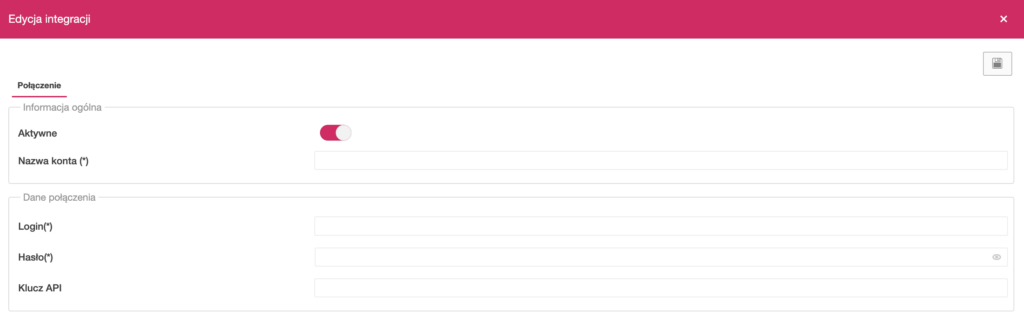
- Enter your own integration name (e.g. “Orlen – main account”).
- Enter the obtained client login and password. The API key field is not mandatory.
- Save the settings.
4. Template settings
After a successful connection, you can configure shipment templates by selecting a specific sender address, primary service and additional services. Templates are required to create shipments in Power Hub. How to configure shipment templates.
To edit a previously created template, double-click its name.
5. Creating shipments
You can create shipments:
- From the order view, using the data contained within it. How to create a shipment for an order.
- Manually, by entering the required data yourself. How to create a shipment manually.
All shipments after creation can be found in the Shipments → Shipments summary. section.
While creating a shipment, you can modify the template settings.
6. Tracking shipments
In the Shipments → Shipment tracking section, you will find a list of shipments that have already been dispatched with the carrier. You can check their current status there.