
How to integrate Power Hub with Erli?
Integrating Power Hub with the Erli sales platform enables automatic synchronisation of orders, stock levels and products. Below you will find instructions on how to connect both systems step by step.
1. Generate an API key in Erli
To start the integration, log in to your seller account at erli.pl, and then:
- Go to the account settings.
- Select the “API” or “Integrations” tab.
- Generate a new API key.
- Copy the key – it will be needed during configuration in Power Hub.
2. Log in to Power Hub
- Go to app.powerhub.pl.
- Log in to your account or register if you do not yet have an account.
3. Add the Erli integration
After logging in:
- Go to the Configuration → Integrations. section.
- Click Add.
- Select Erli from the list.
- Enter a custom name for the integration (e.g. “Erli – main shop”).
- Paste the previously generated API key.
- Go to the Shipments tab and set the default template for shipments that will be created for orders from this shop. How to configure shipment templates.
- Now go to the Synchronization tab and set the default flag for orders that they will receive immediately after import. How to configure order flags.
- Save the settings.
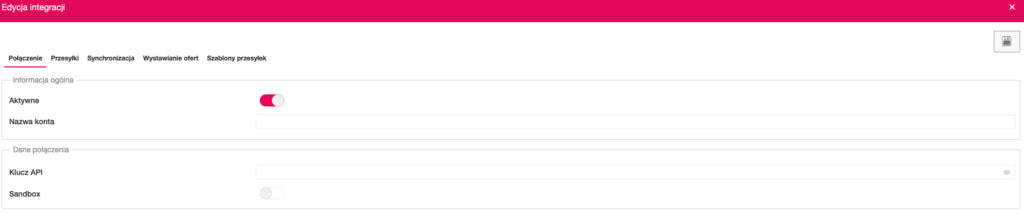
4. Synchronisation settings
After a successful connection, you can additionally configure:
- Order synchronisation (frequency and retrieval period).
- Price and stock updates in offers from Power Hub to Erli.
You will find the settings in the Configuration → Integrations, tab by clicking the pencil icon next to the selected integration.
5. Import and export offers
In the Sales tab, the following options are available:
- Import offers – downloads offers from the platform and creates products in Power Hub.
- Create offers in the marketplace – allows you to publish an offer via Power Hub in the Erli store.
6. Order handling
After activating the integration:
- Orders from Erli will be visible in the Orders module.
- You can process them directly from Power Hub (printing invoices, changing statuses, handling shipments).
- Changes are automatically sent to Erli – the customer is informed about the progress of the fulfilment.